Short answer
In Seller Center, go to Products, then Add Products, pick a method (one at a time, bulk Excel, URL import, quick listing or a synced app), fill in basic information, product details, sales information and shipping, and click Submit for review.
TikTok's own US pages set different limits, so write to the strictest: a title of 25 to 80 characters in title case with no symbols or promo words, a description of at least 500 characters, 5 or more square images of 600 × 600 px or larger, and a video under 5 MB.
What are the ways to add products to TikTok Shop?
Five on desktop Seller Center, plus the Seller Center app and TikTok's API, as TikTok's "How to Add Products to Your Shop" page (updated November 13, 2026) lists them:
| Method | What it does |
|---|---|
| Individual listing | You type every field for one product |
| Quick listing (keyword search) | Fills the listing from a matching product already on TikTok Shop |
| Bulk listing | One Excel template per category, one row per SKU, file up to 5 MB, desktop only |
| URL import | Pulls the listing from a product page on Amazon, Shopify or another site |
| Sync app | An integration keeps Amazon, Shopify or eBay listings in step |
Our pick for a first product is individual listing, because its quality panel shows what TikTok will flag before anything goes live. Imports copy the other site's title and description, which then need the fixes below.
How do you add a product in Seller Center, step by step?
Open Products, then Add Products, click "Add new product" and fill each section in order before submitting.
- Open the listing page
In Seller Center on desktop: Products > Add Products > Add new product. In the Seller Center app: Products > Add Product > Manual Listing.
- Basic information
Images, product name, category, brand and attributes. Pick the most specific end category (a greyed-out one is invite-only) and the brand as on the packaging.
- Product details
The description (TikTok's own generator can draft it) and an optional video between 9:16 and 16:9.
- Sales information
For each variation: a product identifier (GTIN, UPC, EAN, ISBN or JAN, registered with GS1 for most categories), retail price, list price (equal to or higher than retail), stock and your own SKU. Size variations get a size chart.
- Compliance and shipping
Answer the compliance questions if asked. Check package weight (1 to 220 pounds) and dimensions, whole numbers only.
- Check and submit
The quality panel sorts problems three ways: Critical Issues block submission, Needs Attention flags what is likely to get the product made unsellable after listing, and Suggestions are optional. Fix the first two, preview, then click Submit for review.
A new shop also has a cap: at Beginner status you can upload up to 100 products (200 at Standard, 1,000 at Premium), and TikTok may set a lower limit for your shop. Shop setup itself (documents, the referral fee, payouts) is in our guide to selling on TikTok Shop.
What limits does each field have?
It depends which TikTok page you read: five US Seller University pages give different numbers for the same fields (the app and bulk guides agree, so they share a column), so meet the strictest and every page is satisfied.
| Field | Add products guide (11/13/2026) | What You Need to Know (10/09/2026) | Seller Center app and bulk guides (11/06/2026) | Listing Policy (11/06/2026) | Write to |
|---|---|---|---|---|---|
| Title length | 25 to 200 characters | 25 to 200 characters | Over 25, 80 or fewer recommended | No number | 25 to 80 |
| Title case | Not stated | Capitalize each word | Capitalize each word | Not stated | Title case |
| Description | Each selling point under 250 characters | At least 500 characters | Each selling point under 250 characters | At least 30 words, 3 to 5 bullets | 500+ characters, 3 to 5 bullets |
| Images | At least 1, up to 9, 600 × 600 px, 10 MB each | At least 5, up to 9 square, 600 × 600 px | Up to 9 per variant | Up to 9 square, main image on pure white | 5 to 9 square, white main image |
| Video | Up to 100 MB | 1 video, 5 MB | Not stated | 1 video, 5 MB | Under 5 MB |
Two gaps change what you do. Words run short of characters: in our run below, a 42-word description came to 224 characters, so a seller reading only the policy writes descriptions another page calls too short. And the video: the upload guide says 100 MB while two pages still say 5 MB, so export a short, compressed clip under 5 MB or check what the form accepts on the day.
Does a generated listing pass TikTok's rules?
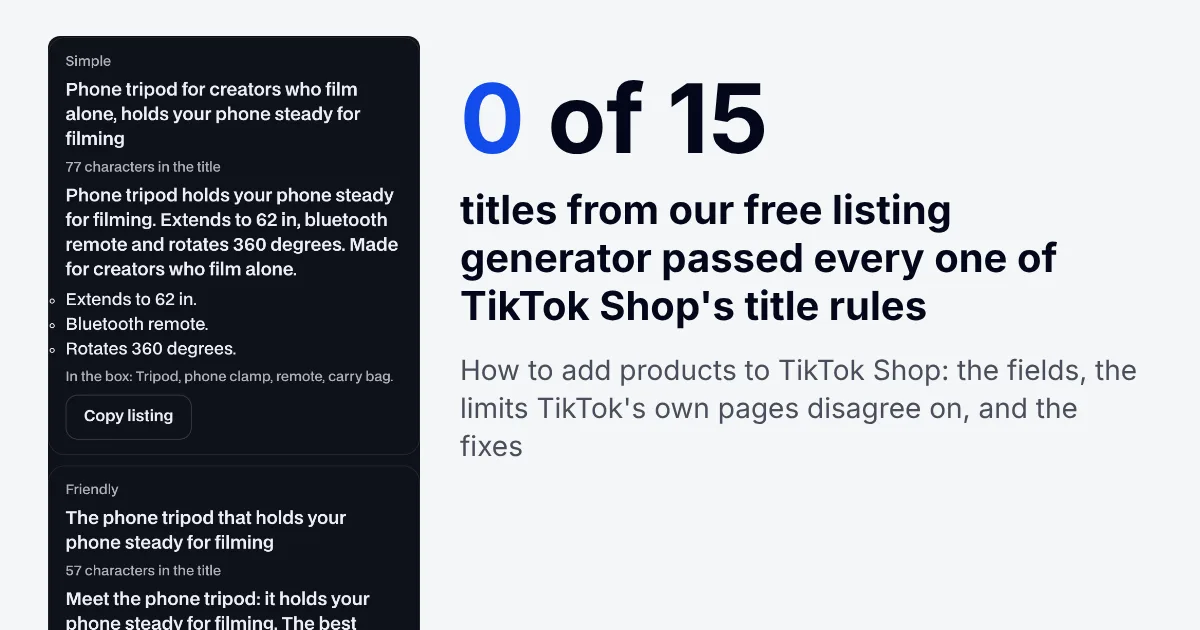
Not as written: we ran our own free product description generator on 5 made-up products in all three of its voices, and 0 of the 15 titles and 0 of the 15 descriptions passed every rule in the table above.
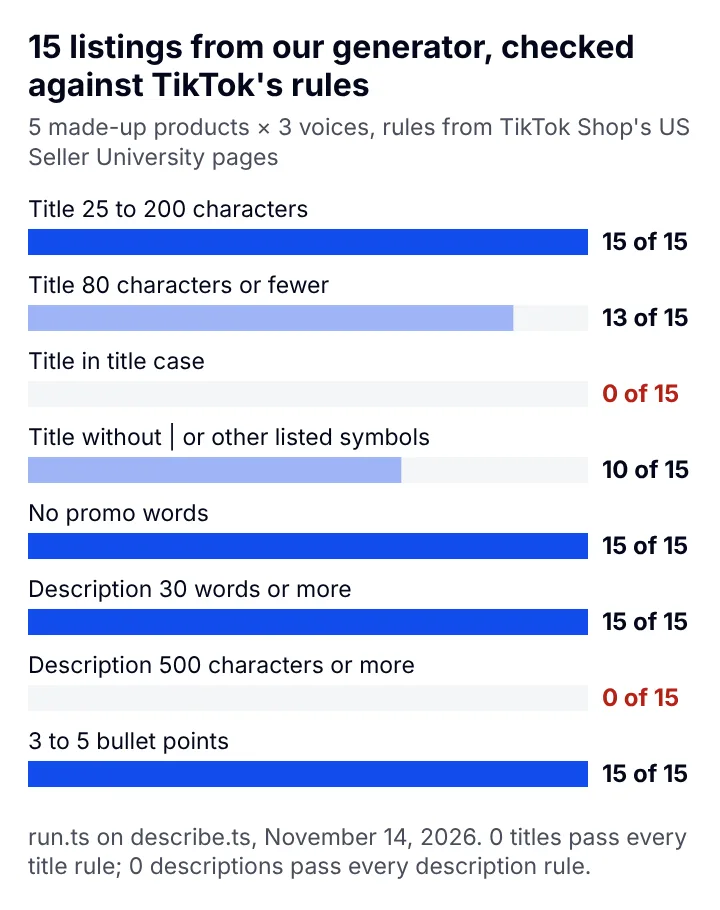
Every description cleared the 30-word floor (the shortest had 42 words) and none reached 500 characters: they ran 224 to 370. No title was in title case; the tool writes sentence case. All 5 Premium titles use a vertical bar, a symbol TikTok says to avoid, and 2 Simple titles ran over 80 characters (the makeup mirror's: 104). None carried a brand: the tool has no brand field.
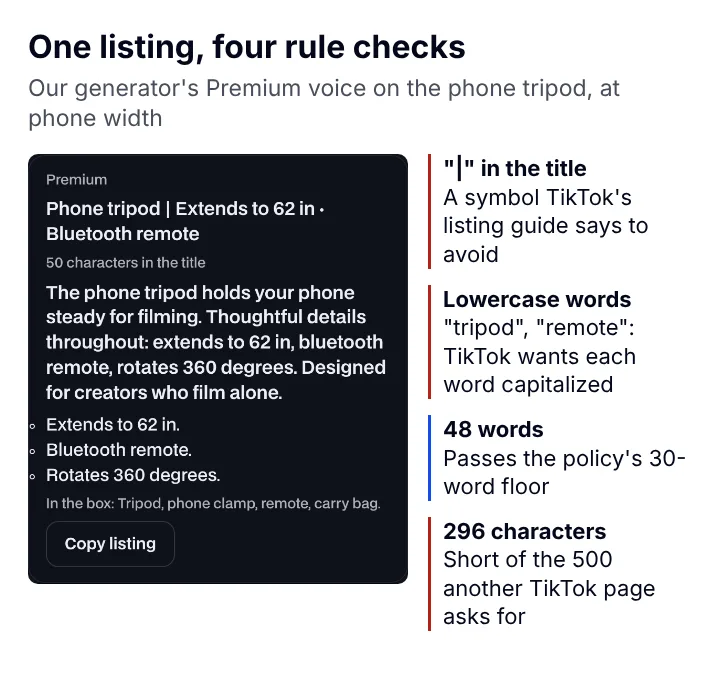
We also typed TikTok's own examples of banned wording into the tool's features box one at a time. Its risky-claim check caught the health and results claims ("Clinically proven" and "Cures acne") but only 1 of the 9 promo phrases and dupe claims TikTok names: "100% satisfaction guaranteed", for its "guaranteed". "Best Seller", "free shipping", "low stock", "Trending Item" and the rest went through. Treat any generated listing, ours included, as a draft.
How do you write a product title that passes?
Follow TikTok's own order: brand, product details, application scope, product type, then main features, in title case, 80 characters or fewer, with numerals and short units.
- Start with the brand
Exactly as on the packaging. Without brand authorization, Seller Center marks the brand unauthorized and buyers don't see it.
- Add the facts a buyer filters by
Size with short units (30 oz, 62 in), the count for multi-packs (Pack of 6), the key feature.
- Name the product type and use
"Insulated Tumbler", "for Car Cup Holders". Sizes and colors go in the variation names.
- Clean it
Capitalize each word except with, at, by, to, in, for, from, of, and, or, the, a, an. Use commas instead of | or other symbols. Cut seller names, URLs, "TikTok" and every promo word.
- Count it
25 to 80 characters with spaces.
| Product | Fixed title | Characters |
|---|---|---|
| Insulated tumbler | [Brand] 30 oz Insulated Tumbler with Straw Lid, Leak-Proof, Fits Car Cup Holders | 80 |
| LED makeup mirror | [Brand] LED Makeup Mirror with 10x Magnifying Side, 3 Light Tones, Rechargeable | 79 |
| Heated eye mask | [Brand] Heated Eye Mask for Travel, 3 Heat Levels, Auto Shut-Off, Washable Cover | 80 |
| Slow feeder dog bowl | [Brand] Slow Feeder Dog Bowl, 2 Cup Maze Bowl with Non-Slip Base for Fast Eaters | 80 |
| Phone tripod | [Brand] 62 in Phone Tripod with Bluetooth Remote, 360 Degree Rotation, Carry Bag | 80 |
Each runs 79 to 80 characters with "[Brand]" in place, so a brand longer than 7 characters means cutting a feature, never the product type. Claim rules (health, results, comparisons) are in our TikTok Shop rules guide.
What photos and video does a listing need?
Five to nine square photos of at least 600 × 600 px, the first on a pure white background showing the front of the product, and at most one video.
The others show the back, sides, details and the product in use, never two from the same angle. No image may carry added logos, text, borders or watermarks. Files are JPG, JPEG or PNG, up to 10 MB each.
A ratio between 3:4 and 4:3 uploads as it is, so a normal iPhone photo is fine. Outside that range, the bulk listing tool pads the image with white bars to make it square:
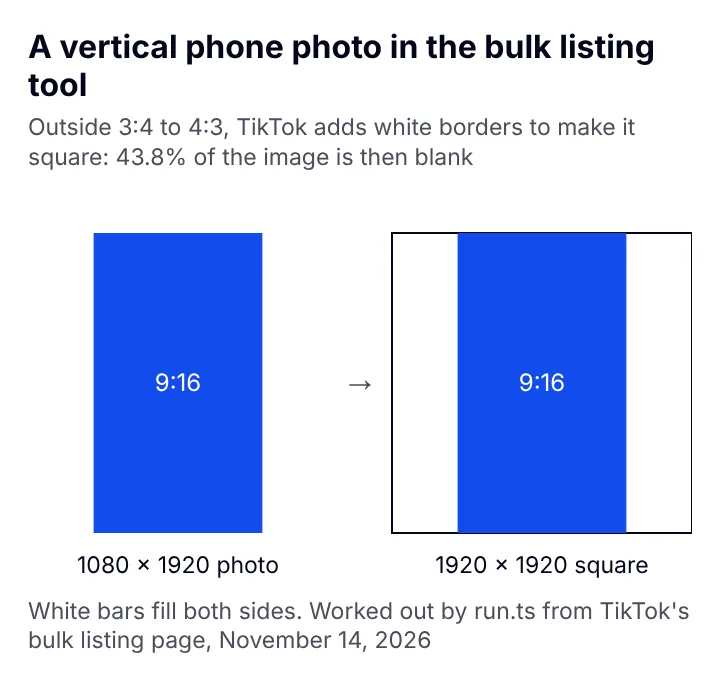
A 9:16 screenshot or video frame comes out 43.8% blank, a 16:9 frame the same, while 3:4 and 4:3 photos and squares upload untouched. On any background other than white, the bars become the added borders the policy bans. Our pick: crop every photo to 1:1 yourself before uploading, because then you choose what gets cut. A 500 px web image fails the 600 px floor whatever its shape.
How do you get creators to promote a new product?
Once the product is live (it sits in pending review until then, and TikTok's US pages give no standard review time), add it to an affiliate collaboration so creators can attach it to their videos.
- Open collaboration: the product is visible to every TikTok Shop creator, with an optional approval mode. You set a commission of 1% to 80%.
- Target collaboration: you invite chosen creators, who can start promoting as soon as they accept, and you can offer free samples. Its rate always overrides the open rate, so set it higher.
Our pick for a first product: an open collaboration at once, then target invites with samples to the creators who post about it, because the open plan finds them for you. How affiliates see your offer is in our TikTok affiliate program guide, and creators attach products as shown in adding the product link to a video. For videos before any creator signs up, our AI makes TikTok Shop videos from a product link: a batch per listing, each with its own format and hook.
What didn't we check?
Nothing here was submitted to Seller Center: we used no seller account, so we didn't see its quality score, review times, bulk upload error messages, rejection reasons or which video limit the form enforces today. The products are made up and the rules are TikTok's US pages only.
We tested only our own generator; Seller Center's built-in one and paid tools may handle title case or length better.