40% off every planSee plans

How do you add a TikTok Shop link to a video?

To add a TikTok Shop link to a video, tap "Add link", choose Product, pick it from your showcase and post.

Short answer

On the posting screen, tap "Add link", choose Product, pick it from your showcase and post.

A yellow cart appears at the bottom left. No Add link option usually means you aren't approved for TikTok Shop yet.

  • "Add link", then Product, on the posting screen
  • A yellow cart appears at the bottom left
  • 30 daysAn older video can get a link if posted within this
  • 100 daysA shared link stays eligible for commission
  • No Add link usually means you aren't approved yet

How do you tag a product in a TikTok video?

From the TikTok camera: post screen, product, posted video
  1. Tap "Add link", then Product

    On the posting screen, after your edits.

  2. Find it in your showcase

    Search by name. Products you've had samples of appear in the list.

  3. Edit the product name

    It's what buyers see on the cart, so keep it short and accurate.

  4. The yellow cart

    Buyers see it in the lower left corner once you post.

Illustration of the posting flow, drawn by UGCLive from TikTok Shop's US page on adding a product link (September 15, 2025).

From Creator Center instead: tap "Create Video", pick the product on the Product Selection page, edit its name and record with it attached. Either way the product must be in your showcase first: tap Add in Product Marketplace, paste its TikTok Shop link into the showcase, or accept a seller's invitation.

Sometimes: Creator Center, Toolkit, Link products (not for every creator yet)

  1. All four conditions met

    Posted in the last 30 days, Commercial Music Library sound only, the product appears in the video, and it follows TikTok Shop's content policy.

  2. Older than 30 days

    Make a new video instead.

  3. Other music

    Only Commercial Music Library sound or music qualifies.

  4. The product isn't in it

    The product you're linking has to appear in the video.

Illustration by UGCLive from TikTok Shop: How to link products to videos after you've posted (US), read through its published summary on November 5, 2026.

If it doesn't qualify, make a new video. Deleting and re-uploading the same one counts as reposting your own content.

What's usually behind a missing Add link option, and what to do
What you seeLikely reasonWhat to do
No TikTok Shop option at all
You aren't an approved creator yet
Apply in TikTok Studio; the US bar is 1,000 followers
Product doesn't appear in search
It isn't in your showcase
Add it from Product Marketplace or paste its link
Only some products appear
You're in the pilot, limited to shops rated 95% or higher
Pick from those, or wait for 5,000 followers and 30 days
Link option stopped working
A posting cap or a Creator Health restriction
Check your Creator Center for notices

The table is our reading of TikTok's eligibility and health rating pages. Under 1,000 followers: what you can do before the bar.

What gets a linked video taken down?

TikTok's own example: show a blender, link a frying pan
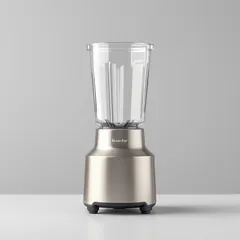
Irrelevant promotion
Matches the video
  1. Linked, but not shown

    Also flagged: products never displayed or discussed, a shown product that isn't in the listing, one only in the background or out of focus, and several products not matched to their listings.

  2. Linked and shown

    The product on screen is the product in the cart.

Illustration by UGCLive of an example in TikTok Shop's Creator and Content Policy Guide (US, dated October 9, 2026): irrelevant promotion, each repeat costing Creator Health Rating points.

The rest: TikTok Shop's rules and violations. Linking a free sample's product: sample rules.
More about add a product link

Can you share a TikTok Shop link outside a video?

Yes. Tap Share on a product, showcase or campaign and choose Copy Link. You earn the same commission as from a video, and you don't need the product in your showcase.

100 days
a link stays eligible for commission
Last click
wins when two affiliates' links were clicked
1 product
only the linked item in a cart earns

TikTok Shop: Sharable affiliate links for creators (US, dated July 29, 2025).

Sales come from the videos the link is on. Paste a product link and our AI makes a batch, ready to tag. More on commission: the affiliate program.

What didn't we check?

  • The app's menusThese are TikTok's written steps from a 2025 page. Labels can move between versions.
  • Products per videoTikTok has a multi-product link feature, whose limits we didn't read.
  • Other countriesThe steps are from the US pages.

Sources

On November 5, 2026 we read TikTok Shop's US pages on adding a product link (September 15, 2025), sharable links (July 29, 2025), eligibility (September 25, 2026) and content policy (October 9, 2026). The older-video page errored, so its conditions come from its search summary. We posted no test video.

  1. TikTok Shop: How to add a product link to your video (US, dated 09/15/2025) (checked November 5, 2026)
  2. TikTok Shop: How to link products to videos after you've posted (US) (checked November 5, 2026)
  3. TikTok Shop: How do I add products into Showcase? (US) (checked November 5, 2026)
  4. TikTok Shop: Sharable affiliate links for creators (US, dated 07/29/2025) (checked November 5, 2026)
  5. TikTok Shop: Creator eligibility policy (US, dated 09/25/2026) (checked November 5, 2026)
  6. TikTok Shop: Creator and content policy guide (US, dated 10/09/2026) (checked November 5, 2026)

Add a product link questions

How do you add a TikTok Shop link to your bio?

Your showcase shows on your profile once you're a creator. For a link you can paste elsewhere, tap Share on a product or showcase and choose Copy Link. Website links in a bio have their own rule, which our bio generator page covers.

How do you add a link to a TikTok video without TikTok Shop?

You can't put a clickable link in a normal video caption. The Add link option is for products and other TikTok features, so outside TikTok Shop viewers have to go through your bio.

Do you need followers to add a product link?

You need to be approved first: 1,000 followers for US affiliates. A seller's own official account has no follower minimum and can tag its own products.

Why did my yellow cart disappear?

TikTok can remove product links from content that breaks its rules. Check the video's status and your notices in Creator Center. Never had one? Why TikTok Shop isn't showing.

Still have questions?Email us

Related

UGCLive for TikTok Shop

Have a video worth linking on every product.

Paste a product link and our AI makes a batch of finished videos, each a different format with its own hook.