Short answer
Filler words are sounds and words that fill a gap while you think, like um, uh, like, you know, so and basically.
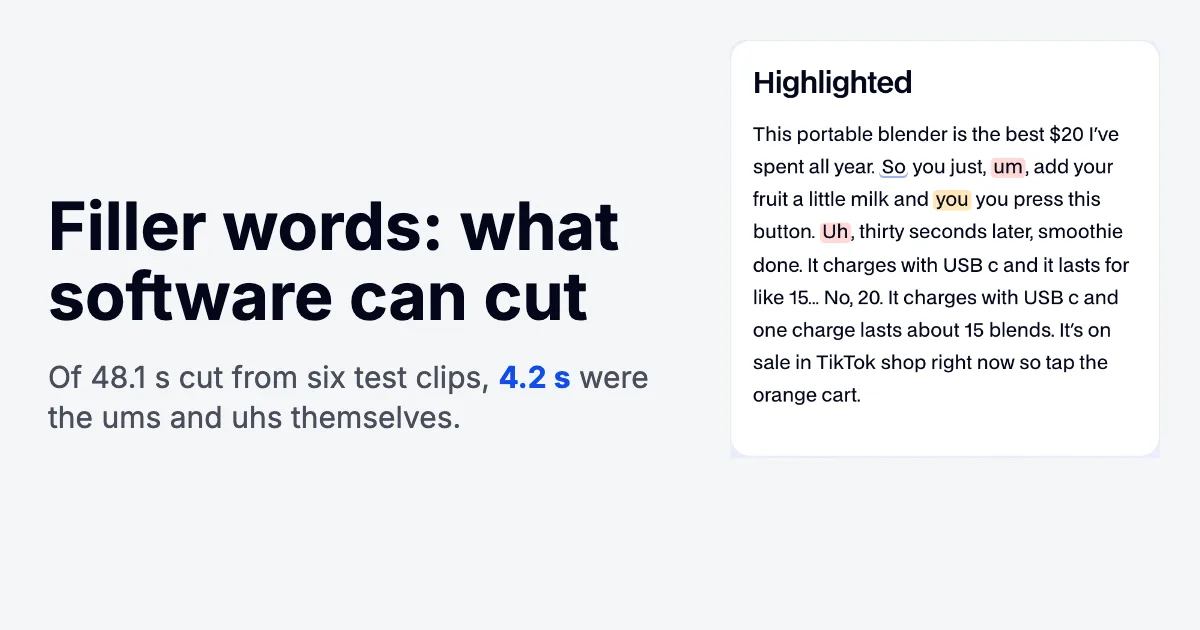
In a recorded video, software can usually cut the sounds (um, uh, erm), but word fillers like "like" need a script or a retake, because they are often real words. In our six test clips, the ums and uhs were under a tenth of what a filler cutter removed; nearly all of it was long silences elsewhere.
What are filler words?
Filler words are the sounds, words and short phrases people say to fill a gap in speech while they plan what comes next. Grammarly's list groups filler sounds (um, uh, er), adverbs of intensity (very, really), hedging language (I mean, I guess), end-of-sentence tags (you know, right), like, just, and words such as literally and totally.
Linguists don't treat them as mistakes. In a 2002 paper in Cognition, Herbert Clark and Jean Fox Tree argued that uh and um are conventional English words: speakers use uh to announce a minor delay and um a major one. The sociolinguist Valerie Fridland, interviewed by Stanford's business school in 2023, describes them as holding your turn: "this is my turn and I just need a sec."
In a 30-second UGC ad nobody can interrupt you, so that signal has no job to do and the gap just costs watch time.
Which filler words are most common, and when are they fine?
The most common are um, uh, like, you know, so, basically, actually, literally, right and I mean. Most word fillers also have a normal meaning, so the table says when each one is doing real work.
| Filler | Type | Keep it when | Safe for software to cut? |
|---|---|---|---|
| um, umm | Sound | Almost never in an edited video | Yes |
| uh, uhh, er, erm | Sound | Almost never in an edited video | Yes |
| hmm, mm, mhmm | Sound | You're reacting on purpose, for example tasting something | Yes, but put a deliberate reaction back by hand |
| like | Word | It compares ("looks like glass") or means about ("like 12 dollars") | No |
| you know | Phrase | It ends a line and invites the viewer in | No |
| so | Word | It links a cause and a result ("so it lasts all day") | No |
| basically | Word | You're giving a real summary | No |
| actually | Word | You're correcting an expectation ("it's actually unscented") | No |
| right | Word | It's a real question to the viewer | No |
| I mean, kind of, sort of | Hedge | You're rephrasing or being honestly unsure | No |
More filler words and phrases people lean on: well, okay, just, really, very, totally, honestly, anyway, I guess, I think, you see, or something, and stuff, at the end of the day. Fridland's example of a real one: in "he's like 12 years old", like means about.
How do you stop using filler words?
Know the next line before you need it, then pause instead of filling. That holds for a meeting, a talk or a video; on camera a script and a steady pace do most of it.
- Script the hard lines, not the whole video. Fillers come from searching for the next word, so put claims, prices and steps on a teleprompter, and talk the story part from bullet points so it doesn't sound read.
- Count your own top three. Record a minute of yourself talking, paste the transcript into the filler word counter and see which fillers you lean on.
- Start at 150 words per minute. That's our free teleprompter's starting speed, inside the 130 to 160 range its guide calls conversational; go slower for prices and steps.
- Pause instead of filling. Silence in a recorded video gets cut cleanly. VirtualSpeech's advice for live talks is the same: pause, then repeat the last few words without the filler.
Do filler words hurt a UGC video?
Yes, mostly through credibility and pacing. In a 2019 Cal Poly study with 145 participants, a speaker who used more fillers and discourse markers was rated lower on professional and personal credibility, whether the recorded speaker was a man or a woman.
Don't strip every one, though. Thesaurus.com notes that some speakers use fillers to sound more relatable to a younger audience, which is the appeal of UGC. A loose "okay, so" before a demo can stay; cut the ums of a lost train of thought.
How much time does cutting filler words actually save?
Less than cutting long pauses, in our test. We ran UGCLive's AI edit rules on six synthetic clips (an AI voice reading UGC scripts with 14 planted ums and uhs, 7 word fillers, 5 stutters and some long pauses), 184.8 seconds in all. The voice skipped 2 of the planted sounds, so 12 reached the transcripts. The edit removed 48.1 seconds: 4.2 were those 12 ums and uhs, 0.3 were 2 stutters and 43.6 were silence.
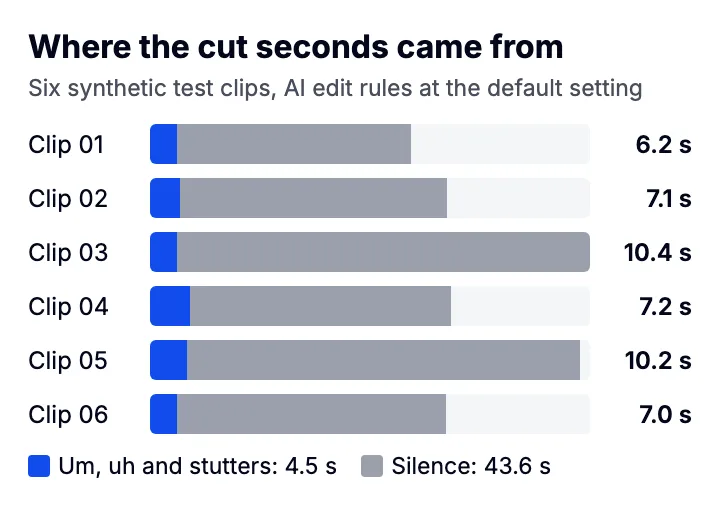
So the ums, uhs and stutters were 9% of what came out, and only 1.5 seconds of the silence sat within half a second of an um or uh. The rest was long pauses between sentences. We planted those pauses, so a real take will split differently, but the lesson holds: an um costs a fraction of a second, and if you only hunt ums you leave most of the dead air in.
How do you cut filler words out of a video?
Find them in a word-level transcript, remove those words plus the dead air around them, then shorten the pauses that are left. By hand that's scrubbing and splitting on a timeline; with a transcript-based editor it's one pass.
- Get a transcript that keeps the fillers
Some speech-to-text services delete um and uh to make transcripts readable. Deepgram strips both unless you set filler_words=true, so a default transcript can hide exactly the words you want to find.
- Cut the sounds first
Remove every um, uh, erm and hmm. Listen again only where you reacted on purpose, like tasting something or agreeing with an off-camera question.
- Cut stutters and restarts
"I I tried" becomes "I tried". Keep the second try, the one you finished.
- Shorten the pauses, don't delete them
A starting point: shorten any gap longer than about 0.3 seconds to about 0.15 (UGCLive's defaults are 285 and 156 ms, with 250 ms kept after a full stop), keeping a little air on each side of a word so breaths and consonants aren't clipped. By hand, in any phone editor: zoom the timeline until you see the flat stretch in the waveform, split at both ends, delete, and close the gap.
- Read the transcript for word fillers
Look for the likes and you knows that carry no meaning. If cutting one makes the sentence wrong, keep it or reshoot the line.
- Cover the jumps
Each cut makes the picture jump. Captions, a slight zoom on alternate cuts or B-roll make the jumps read as pace.
Why can't software find every "like"?
Because the clue is punctuation, and transcripts often drop it. Our free filler word counter only flags like when commas set it off ("I used to have, like, these dark spots"), since "looks like glass" is a real word.
When we pasted the six Deepgram transcripts in, it found all 12 filler sounds in them and 2 stutters, but only 4 of the 7 word fillers we planted. Commas were the problem: one script said "it keeps ice for, like, a full day" and the transcript wrote "it keeps ice for like a full day". Another planted "like" ("lasts for like fifteen") had no commas in the script either, and there it reads as "about", so skipping it is arguably right.
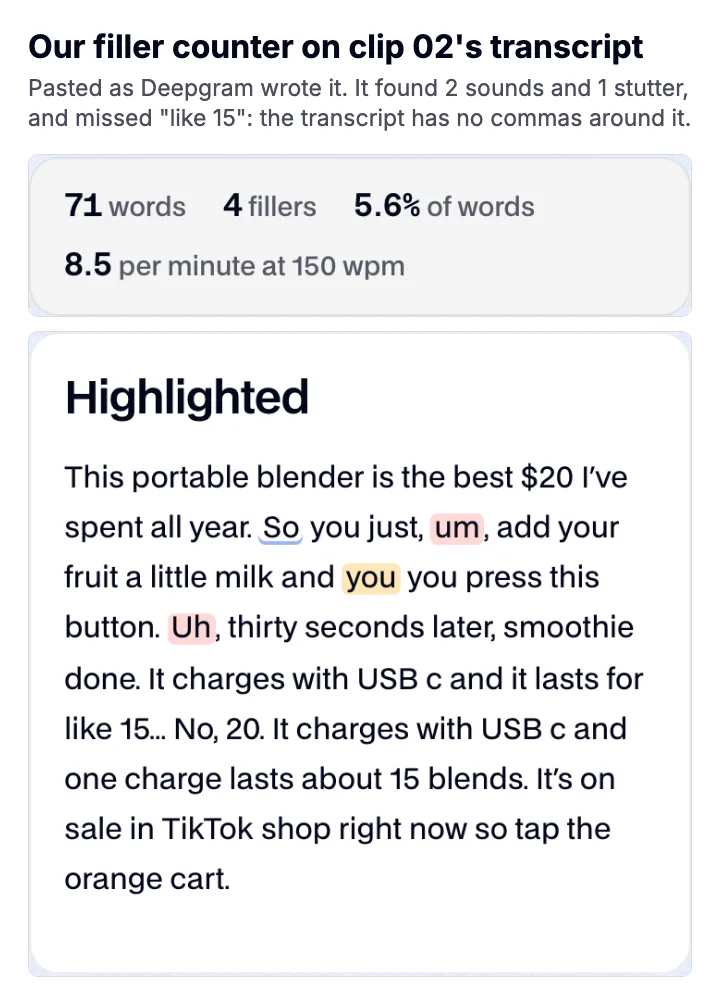
Our pick: let software cut the sounds and the pauses, and fix word fillers in the script before you film, because a transcript can't reliably tell a filler like from a real one. On our clips both our counter and AI edit caught every spoken um and uh; the counter flagged only some of the likes, and AI edit leaves likes alone by design.
What does UGCLive's AI edit cut, exactly?
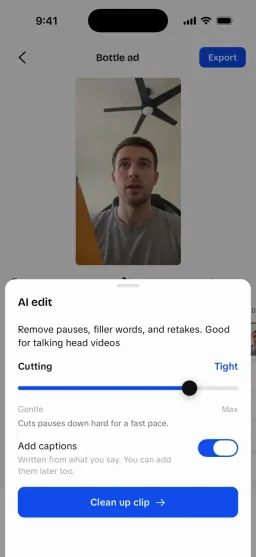
AI edit cleans up a talking-head clip: it shortens long pauses, cuts filler sounds like um and uh, removes stutters and keeps only the last good take of a line you repeated. Here are the rules in its code, read on October 14, 2026.
- Filler sounds, by rule. um, uh, umm, uhh, hmm, mhmm, mm and erm are dropped wherever they appear, including an mhmm that answers a question or an mm while tasting, so put those back by hand. The transcript comes from Deepgram Nova-3 with fillers switched on.
- Stutters, by rule. A word said twice within 1.5 seconds loses its first copy, and a repeated two-word run ("so we so we") loses the first pair. Repeats people mean, like "very very", "no no" and "okay okay", stay.
- Retakes and false starts, by judgment. Claude reads the transcript as numbered sentences and names the ones to remove, keeping the last complete take. If its answer would remove more than half the words, the editor ignores it.
- Pauses, by the Cutting slider. Any gap between kept words, inside or between sentences, longer than 450 ms at the gentle end, 285 ms at the default or 120 ms at the tightest is shortened, to 230, 156 or 80 ms (a little more after a full stop). That rule removed the long silences in our test.
Word fillers like like, you know and basically are never cut by rule. In our run that left all 7 planted word fillers in place, by design. 2 of the 5 planted stutters were caught; the rest weren't, because the transcript wrote them as different words ("they're they're" became "there they're"), and the rule only matches exact repeats.
What did our test leave out?
Our clips are synthetic: a text-to-speech voice with planted problems, so its fillers and pauses are tidier than a person's, and the voice skipped two of the planted sounds. The Claude retake step wasn't run. We only tested English, and we didn't compare other editors' filler removal.