AI tools for content creators, step by step
Which AI tool helps at each step of making a short video, from the idea to the post, picked from the apps we compare on this site plus our own free tools, with each paid one's price read from its own page on one day, and what a whole kit costs a month.
Updated . Outside prices and features are read from each company's own pages on the dates shown with them.
An AI content creator kit can cost nothing: free AI tools now cover every step of a short video, from a hook generator and script template to a teleprompter, VN or Adobe Premiere for editing with free captions, and a safe zone check before posting.
Pay when one step eats your time: InShot Pro ($4.99 a month) cuts silences on the phone, Descript and Submagic speed up desk editing and captions, and Opus Clip turns long videos into shorts.
- Free kit
- $0/mo
- Phone kit
- $4.99/mo
- Long-video kit
- $15/mo
- AI actor kit
- $15/mo
- Desk kit
- $43/mo
Paid prices are monthly billing in USD, from each company's pricing page or US App Store listing, read on October 16, 2026. The free tools are ours or free apps.
Which AI tool helps at each step of a video?
- 5. Edit: VN or Adobe PremiereNo watermark on free exports in either; VN adds a teleprompter and free captions.Free or from $4.99
- 6. Caption: VN's on-device captionsFree in 43 languages, with no watermark.Free or from $19
- 7. Clip a long video: Opus Clip FreeClips from a long video; caption templates carry a watermark and exports last 3 days.Free or from $15
- 8. No filming: AI actor: Creatify Free10 credits a month, exported with a watermark.From $15
- 9. Post: Safe zone checkerCheck captions clear the app's buttons with the safe zone checker, then pick a time to post.Free
Each step's free pick is above; the paid options are below. If you are starting out, the guide to becoming a content creator covers what to post before any of this, and the free tools directory has every tool we make.
Which AI tools are worth paying for?
- EditFree pick: VN or Adobe Premiere
- Yes: InShot Pro · $4.99/moAI Cut removes silence, filler words and breaths on the phone; Pro removes the watermark.
- CapCut Pro · $19.99/moAuto captions, motion tracking and other AI tools; free templates on every plan.
- Descript Hobbyist · $24/moEdit by transcript on a computer: 600 media minutes a month, 1080p, no watermark.
- CaptionFree pick: VN's on-device captions
- Submagic Starter · $19/moAnimated captions for 15 videos a month of up to 2 minutes, no watermark.
- Captions Max · $24.99/mo500 AI credits a month, AI Edit styles and AI Creators, on iOS.
- Clip a long videoFree pick: Opus Clip Free
- Opus Clip Starter · $15/moWatermark-free exports kept 30 days.
- Opus Clip Pro · $29/moNo export limit and 100 GB of storage.
- No filming: AI actorFree pick: Creatify Free
- Yes: Creatify Standard · $15/mo55 credits, about 11 avatar videos of 15 seconds; you own them after the plan ends.
- Check: MakeUGC Starter · $29/mo, billed yearly500 credits, about 5 talking-actor videos; licensed only while you pay.
Each company's pricing page or US App Store listing. Monthly billing; yearly prices are in the table below.
Our reviews have the full plan tables: CapCut plans and prices and AI ad makers compared.
What does a full AI creator kit cost a month?
Four kits, billed monthly
| Free kit | $0 |
|---|---|
| Phone kit | $4.99 |
| Long-video kit | $15 |
| AI actor kit | $15 |
| Desk kit | $43 |
The sum of each kit's monthly prices, from the pages read October 16, 2026.
| Kit | What's in it | Billed monthly | Billed yearly, per month |
|---|---|---|---|
| Free kit | Our free tools, VN and Opus Clip Free | $0 | No yearly plan used |
| Phone kit | Free kit plus InShot Pro ($19.99 a year on yearly billing) | $4.99 | No yearly plan used |
| Long-video kit | Free kit plus Opus Clip Starter | $15 | No yearly plan used |
| AI actor kit | Free kit plus Creatify Standard ($12 a month billed yearly) | $15 | $12 |
| Desk kit | Free kit plus Descript Hobbyist and Submagic Starter | $43 | $28 |
The desk kit drops from $43 to $28 a month on yearly billing, on Descript's and Submagic's own pages Descript Submagic. The free kit costs nothing, at the price of ads in VN and doing more by hand.
What do AI tools still leave to you?
- Your face and voiceAI actor tools make a person, not you; brands hiring creators pay for the real one.
- The product in your handA real unboxing or a before-and-after has to be filmed.
- Checking captions and cutsAuto captions and AI cuts make mistakes; watch the export before posting.
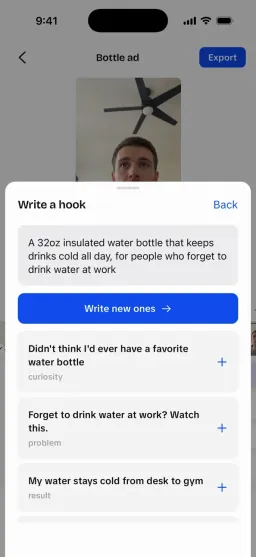
- Picking the hookGenerators suggest openings; you know which one sounds like you.
That is also where the paid work is: the content creator jobs page lists who hires people to film, and the rate calculator prices a video once a brand asks.
What did this list leave out?
Not covered
- Partly: General chatbots (ChatGPT, Claude, Gemini) for ideas and scripts
- Partly: Image and thumbnail generators
- Partly: Scheduling apps and platform analytics
- Partly: Testing each tool on the same video
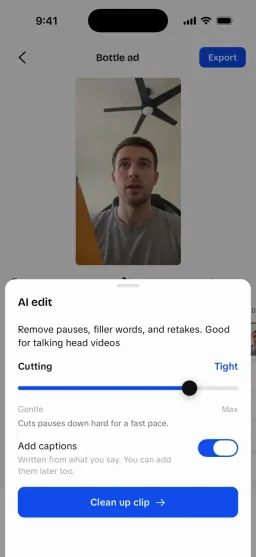
The paid tools here are the ones we already compare on this site, re-priced on October 16, 2026. UGCLive, our own editor that cuts pauses and retakes and captions every word, isn't in the kits: it's ours, and it's in beta in the browser, with the iPhone app still to come.
Free tools for the same video



Sources
Each company's own pricing page or US App Store listing, read on October 16, 2026. Prices change often and can differ by country, platform and promotion; the checkout screen has the final word. Nobody pays to be listed: how we research and test.
AI tools for content creators, step by step FAQ
What AI tools do content creators use?
Most use an editor with AI captions and silence cutting (CapCut, VN, InShot, Descript), a caption styler (Captions, Submagic), a clipper for long videos (Opus Clip), and a chatbot or hook generator for ideas and scripts.
Can I be a content creator with only free AI tools?
Yes. A free kit covers every step: our hook generator and script template, a teleprompter, VN or Adobe Premiere for editing with free captions, and a safe zone check before posting.
Is there an AI that makes the whole video for me?
AI avatar tools like MakeUGC and Creatify generate a person saying your script. They don't film you, so your own face, voice and product in hand still need a camera.
Still have questions?Email us
Other comparisons
Make UGC videos with an AI creator, or a faceless video from a script.
Our AI writes the hooks, makes the parts and edits them together.