




































Short answer
A content creator makes videos or posts for an audience or for a business, and gets paid by platforms, brands or sales commission. To become one, pick one platform and one topic, film on your phone with a clip-on mic and a script, and post on a schedule. Platform payouts start at thresholds (TikTok's Creator Rewards needs 10,000 followers), so the first money usually comes from making videos for brands, which needs samples, not followers.
What is a content creator?
Someone who makes content (short videos, posts, long videos, newsletters) and gets paid for it in one of three ways: by the audience (platform payouts, subscriptions, tips), by brands (sponsored posts, or videos the brand posts itself) or through sales (a commission on what viewers buy). Influencers are content creators whose income is mostly the audience and brand deals; UGC creators are content creators who are paid for the video, not the audience (the UGC explainer shows what those videos look like).
That split decides your first year. Audience income grows with followers and views; brand-made video income doesn't depend on them at all. If the second route fits you, the UGC creator guide covers it in depth.
How do you become a content creator, step by step?
- Pick one platform and a one-sentence topic
"Cheap desk setups for students" beats "lifestyle". One platform at first, because each rewards different lengths and formats: TikTok's payouts need videos of a minute or more, while brands mostly buy 15 to 30-second clips.
- Switch to a creator or professional account
It turns on analytics (views, watch time, who your viewers are). Brands that pay for posts on your account will ask for those numbers. Then say your topic in the bio in one line; the TikTok bio generator drafts a few to start from.
- Set up the phone kit below
Phone, clip-on mic, tripod, a window, and free browser tools for the script, the teleprompter and the safe zone.
- Write before you film
Hook in the first 3 seconds, one point per video, a clear ending. Read it from a teleprompter instead of memorizing.
- Edit tight
Cut the pauses and false starts, add captions (many people watch muted), and put the payoff in the first 3 seconds. Any phone editor works; ours, UGCLive, cuts pauses and retakes for you.
- Post on a schedule you can keep for three months
Three a week you keep up beats daily for two weeks. Change one thing at a time (hook, length, topic).
- Read the right numbers
In each app's analytics, look at how many viewers stay past the first 3 seconds, average watch time, and shares and saves, not likes. Judge a format after 10 or more posts, not one.
- Choose how you'll earn first
Brand-made videos (no followers needed), commission (1,000 followers on TikTok Shop's affiliate program) or platform payouts (thresholds below). Most creators mix them; the map of paid creator work lays out all seven routes.
- Disclose anything you're paid or gifted for
In the video itself, said and shown. The FTC's rules are below.
Is a phone enough, or do you need a content creator camera?
A recent phone is enough. Camera kits sell for hundreds or thousands of dollars, but the platforms ask for far less: TikTok's own ad spec recommends vertical 9:16 video at 540×960 pixels or more, and any phone from the last several years films 1080×1920 (9:16 HD) or better. What viewers notice first is sound and light, so spend there.
- Your phone, filming 1080×1920 at 30 fps, with the lens wiped.
- A clip-on wireless mic. The cheapest upgrade with the biggest effect.
- A tripod or stand, so your hands are free for the product.
- A window in front of you, not behind. A ring light only if you film at night.
- Free tools in the browser: the script template, the teleprompter and the TikTok safe zone checker.
We ran those three tools on one brief, a 30-second problem and solution video for a made-up product (CordClip cable clips), to show what the kit gives you. The script template wrote 5 timed beats with on-screen text and shot notes:
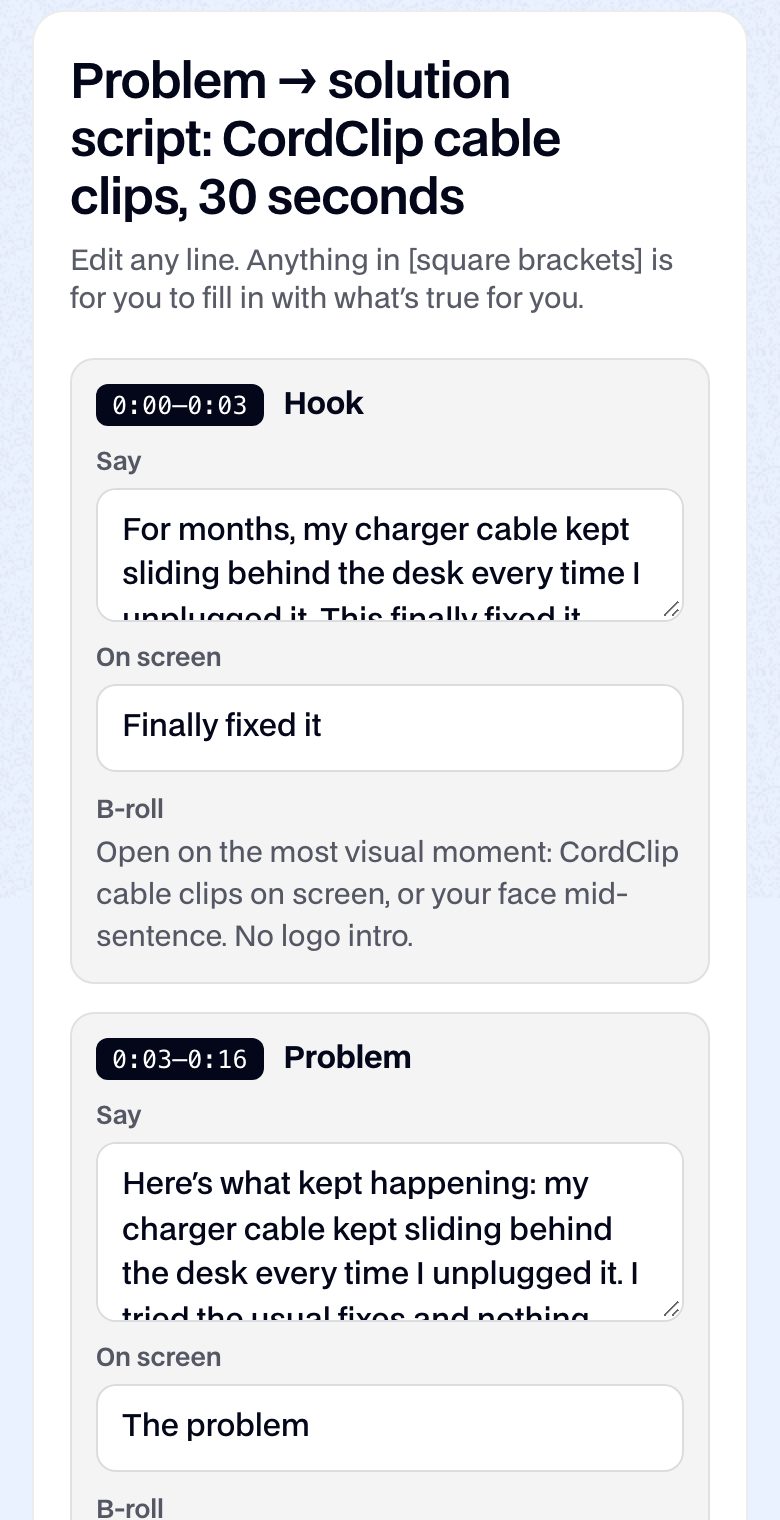
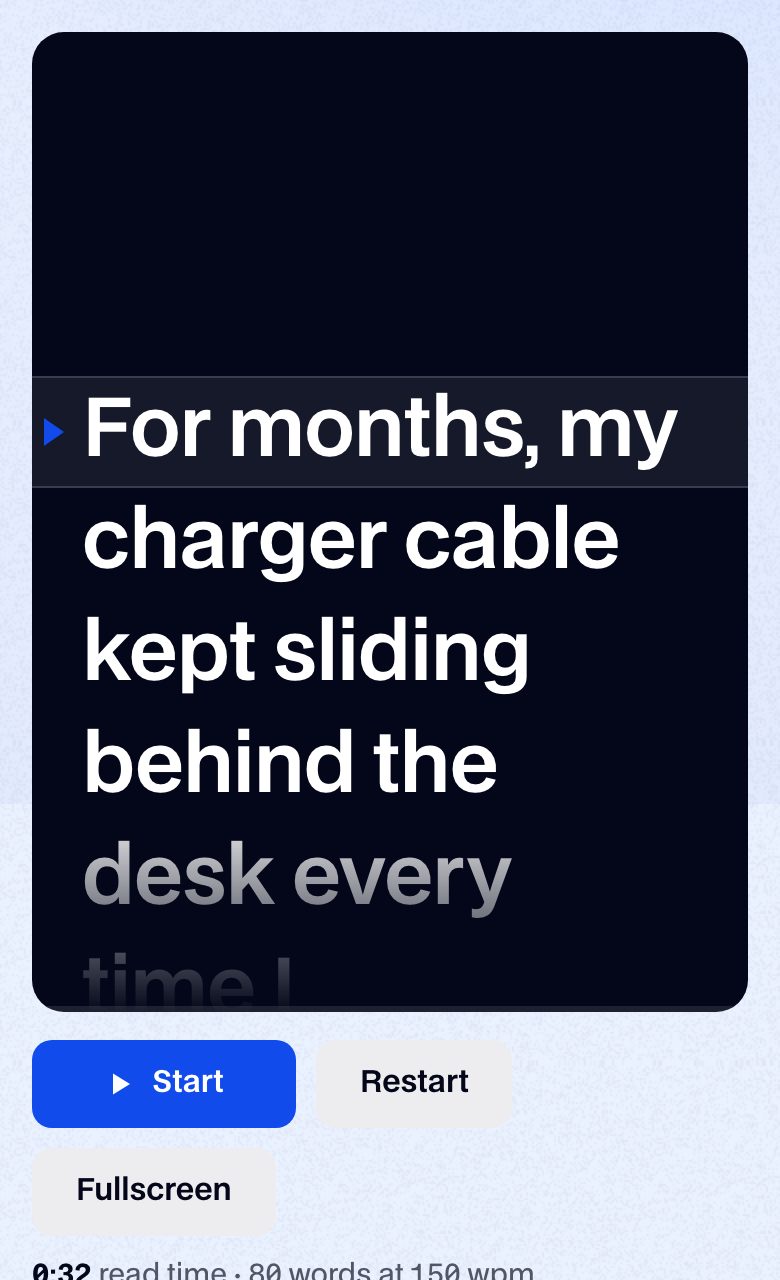
Pasted into the teleprompter, the script came to 80 words, 0:32 at 150 words a minute: over 30 seconds before any pause. Two edits fixed it: the template repeats the problem line in the hook and the problem beat (cut one), and it leaves one bracket, "[what's different for you]", for your own result. Expect to trim any template to your real experience.
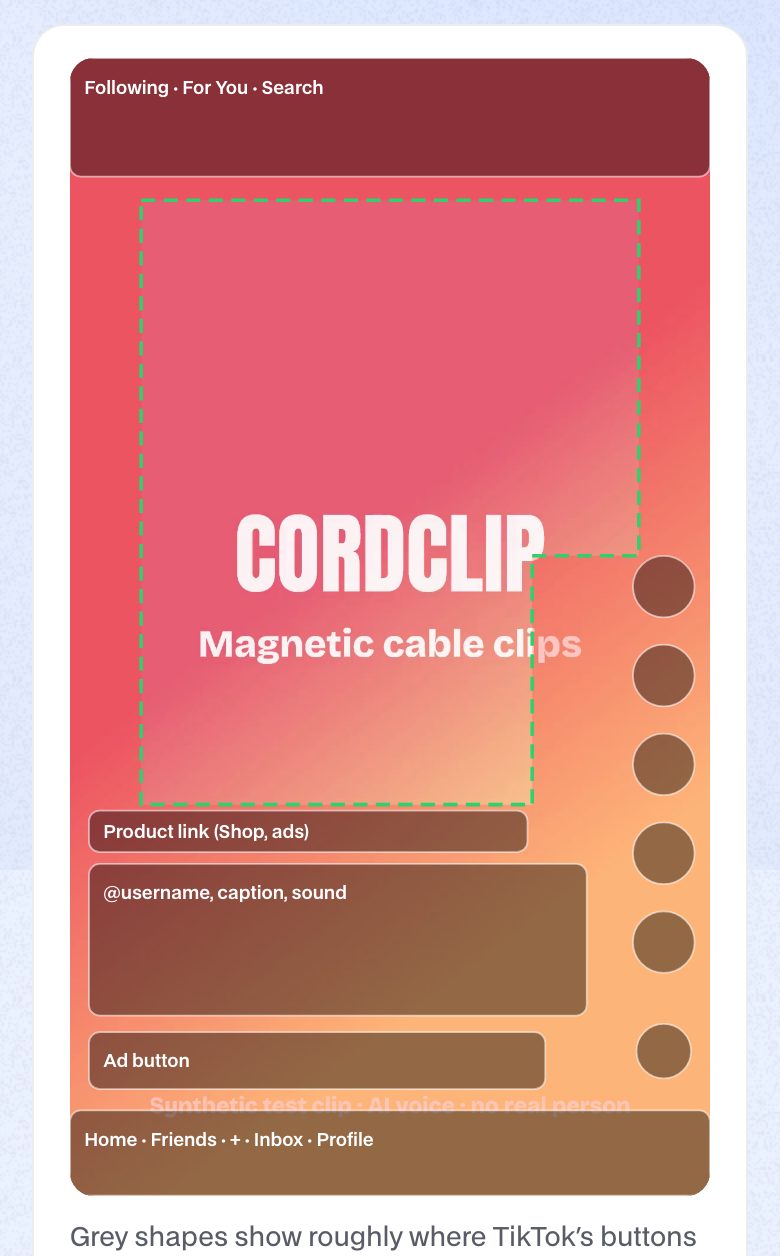
Last, check where text will land before you film it. We loaded a frame of one of our synthetic test clips into the safe zone checker: the product name sits clear, but the end of the subtitle line crosses the safe zone's right edge, into the column where TikTok's like and share buttons sit.
When do platforms start paying content creators?
At a follower or view threshold, which each platform publishes. Read October 14, 2026 (TikTok's rules, and how a qualified view is counted, are in our Creator Rewards guide):
| Route | What you need | What it pays |
|---|---|---|
| YouTube, first tier | 500 subscribers, 3 public uploads in 90 days, and 3,000 watch hours in 12 months or 3 million Shorts views in 90 days | Memberships, Super Chat, Super Thanks, Shopping; not ad revenue |
| YouTube Partner Program | 1,000 subscribers and 4,000 watch hours in 12 months, or 10 million Shorts views in 90 days | A share of ad revenue |
| TikTok Creator Rewards | 10,000 followers, 100,000 views in the last 30 days, 18+, videos of 1 minute or more | Per qualified view, varying by country and video |
| TikTok Shop affiliate (US) | 1,000 followers, 18+, US-based; under 5,000 you start in a pilot with posting limits | Commission on sales, set per product |
| TikTok One, Meta Creator Marketplace | 1,000 followers and 18+ on each | Brand deals you negotiate |
| UGC for brands | None on most platforms; a few samples | Per video, paid by the brand |
How do you make money as a content creator before you have an audience?
By making videos for brands. To see the difference, we priced one month three ways with our own calculators' code. The creator posts 12 TikToks of over a minute, each with 20,000 qualified views:
| Route | Inputs | Cash for the month |
|---|---|---|
| TikTok Creator Rewards | 12 videos × 20,000 qualified views, $0.40 to $1.00 per 1,000 (reported RPMs); needs 10,000 followers first | $96–$240 (typical $168) |
| TikTok Shop affiliate | A $19.99 product at 15% commission, 25 orders, 8% returned; needs 1,000 followers | $68.97 |
| UGC for a brand | 2 edited 15 to 30-second videos, beginner rate, organic use only; no followers needed | $200–$600 (typical $350) |
At the calculator's typical rate of $0.70 per 1,000 views, one beginner UGC video ($175) pays what 250,000 qualified TikTok views do. That's why our pick for a new creator is brand-made videos first, audience second: it's the only route here with no threshold, and the samples you film for your portfolio are also posts for your own account. The table assumes you've found the brand, which is the hard part: Billo and Insense both say a first job takes about 20 to 30 applications. Platform payouts and commission keep paying on old videos, so build toward them in parallel.
How do you land your first paid brand video?
- Film 3 to 5 spec videos
Products you own, in different formats: talking to camera, a demo, a problem and its fix. Label them as samples. The CordClip script above shows the structure; swap in your own product.
- Put them on one page
A portfolio with the samples, your niches and an email. The portfolio builder makes a PDF or image.
- Know your price before anyone asks
Price the video, extra hooks and paid ad usage as separate lines. Our rate calculator's beginner defaults: $175 a video, about a quarter of that per extra hook, and +30% of the fee for 30 days of ads, +50% for 90.
- Apply on platforms and pitch directly
UGC platforms post briefs daily; the UGC jobs guide compares ten. In parallel, email brands you already use with one video idea and your portfolio link.
The full route, with pay by platform and who owns the videos, is in the UGC creator guide.
Do content creators have to disclose ads and gifts?
On your own posts, yes, in the US, whenever a brand gave you anything of value. The FTC's guide for creators says to disclose any financial, employment, personal or family relationship with a brand, including free or discounted products, even if you weren't asked to mention them. Put it in the video, not only the caption, ideally said and shown, with plain words like "ad" or "sponsored", and don't rely on a platform's disclosure tool alone. A UGC video the brand posts or runs as its own ad is the brand's ad to label; you disclose only if you also post it yourself.
What doesn't this guide cover?
- We didn't grow an account to test how long any threshold takes; nobody can promise that, and we don't.
- The income table uses reported RPMs and our calculators' default rates, not anyone's real payouts.
- Instagram's own payouts (gifts, subscriptions) aren't in the table: we couldn't confirm their current eligibility on Meta's help pages, so we left them out rather than guess.
- We tested the free tools at phone width in a desktop browser, not on every phone.
