Invite creators, earn 20% while they subscribeSee how
Free

Free UGC portfolio template

A free UGC portfolio template you fill in on this page: add your bio, sample videos and rates, pick a layout and download it as a PDF or PNG. Nothing is uploaded.

Template
Accent
Paper
Pages

UGC portfolio

Your name

@yourhandleCity, country

  • Niche
  • Niche

About

Two or three lines: who you are, the kind of videos you make, and the brands or viewers they're for.

Sample work

  • Sample 1What it shows
  • Sample 2What it shows
  • Sample 3What it shows

Services and rates

  • UGC video (15 to 30 seconds)Your rate
  • Extra hooks for the same videoYour rate
  • Raw footageYour rate
  • Usage rightsYour rate

Contact

you@email.comYour link in bio or site

Nothing is uploaded. Your text is saved in this browser as you type; photos and videos stay on your device and aren't saved, so add them again after a reload.

About you
Sample videos and photos

Up to 6. Videos show one frame from near the start. Files are read on this device and never uploaded.

Platforms and audience (optional)

Leave this empty if you're starting out: brands hire UGC creators for the videos, not the follower count.

Services and rates (optional)

Turn this off to keep one version without prices and quote each brand separately.

Brands you've worked with (optional)

Only list brands you've made paid or gifted content for, and check your contracts first: some brands don't allow it, and work under an NDA shouldn't be named. Don't use brand logos without permission.

Contact
Back to the preview

Save it as a PDF

Your browser's print window makes the PDF. In it:

  1. Set Destination (or Printer) to Save as PDF. On iPhone or iPad, pinch out on the page preview, then tap Share to save the PDF.
  2. Set Paper size to A4 and Margins to None.
  3. Turn on Background graphics and turn off Headers and footers.

Only the portfolio prints, not this page.

What is a UGC portfolio?

UGC (user-generated content) creators make videos and photos that brands post on their own accounts and run as ads. A UGC portfolio is the page that gets you hired: your best samples, the kind of content you make, what you offer and how to reach you. A brand reads it to decide whether your videos would work for its product.

Because the brand posts the content, follower counts are optional here. If brands are paying for posts on your own account, you want a media kit instead, which leads with your audience numbers. A PDF or image can't play video, so pair this one with a link where the full clips play.

A portfolio is one step on a longer path, and the UGC creator guide covers the rest of it, from picking niches to pricing a brief. If you're also building your own audience, see how creators get started on a phone.

What does a finished UGC portfolio look like?

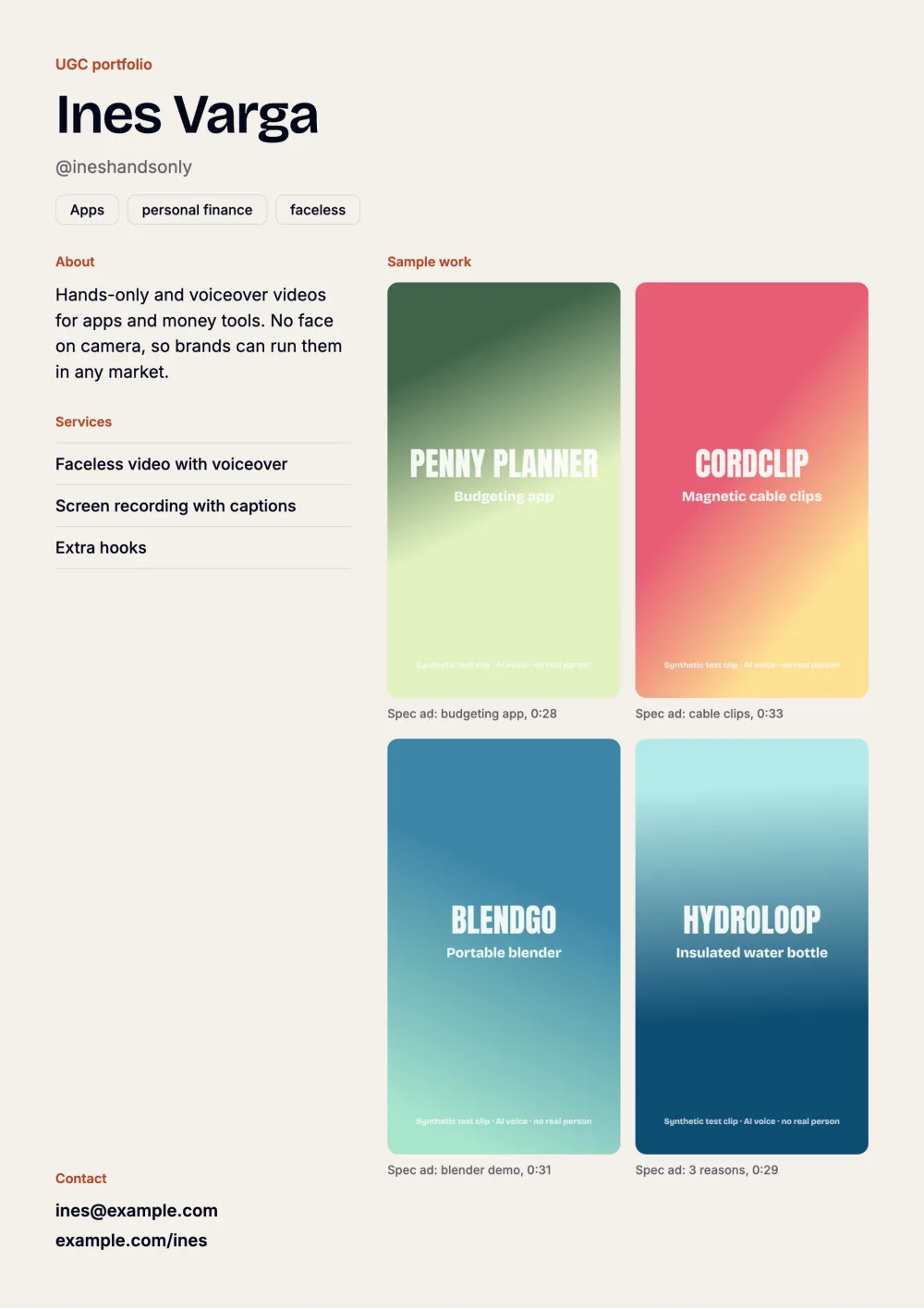
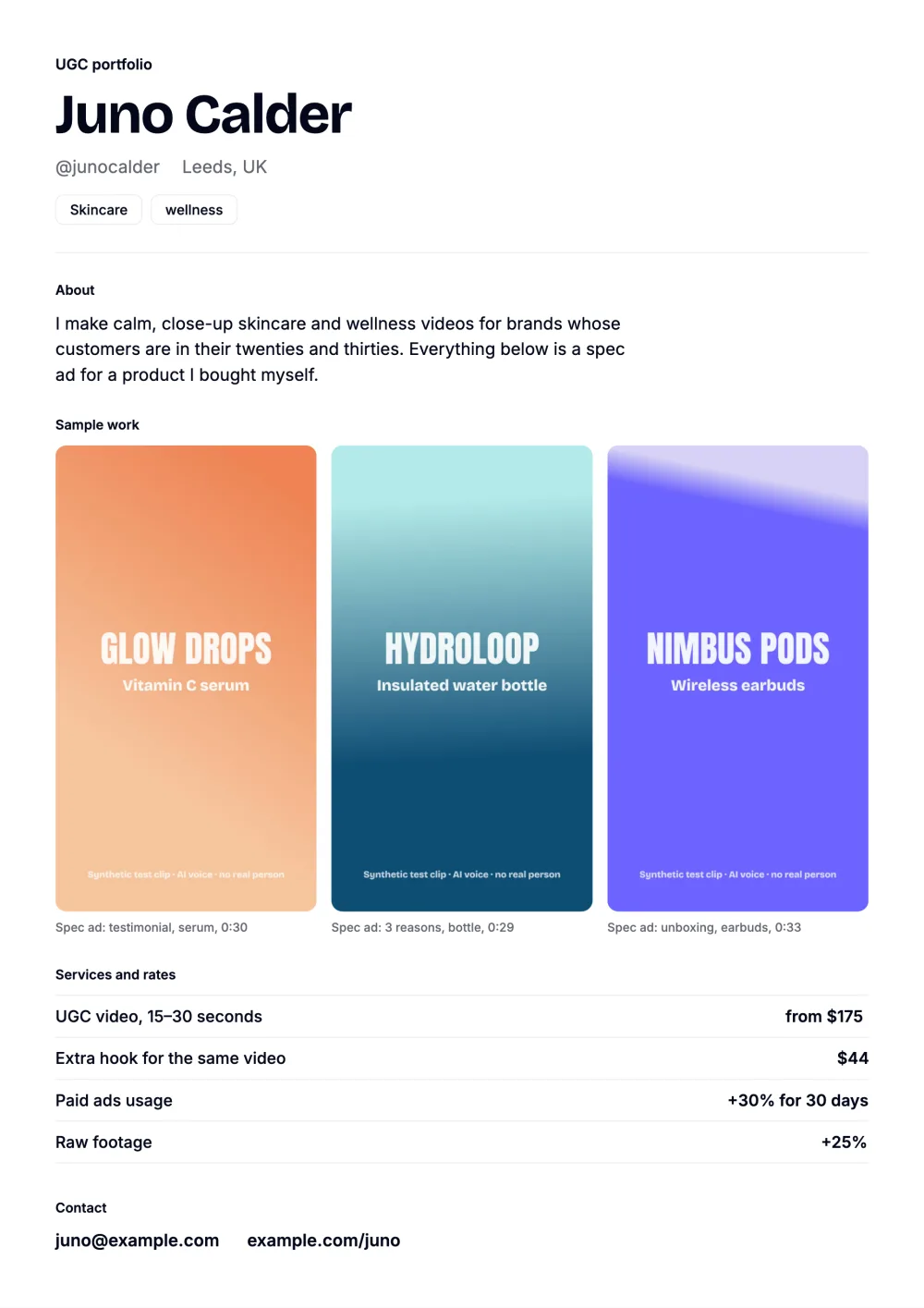
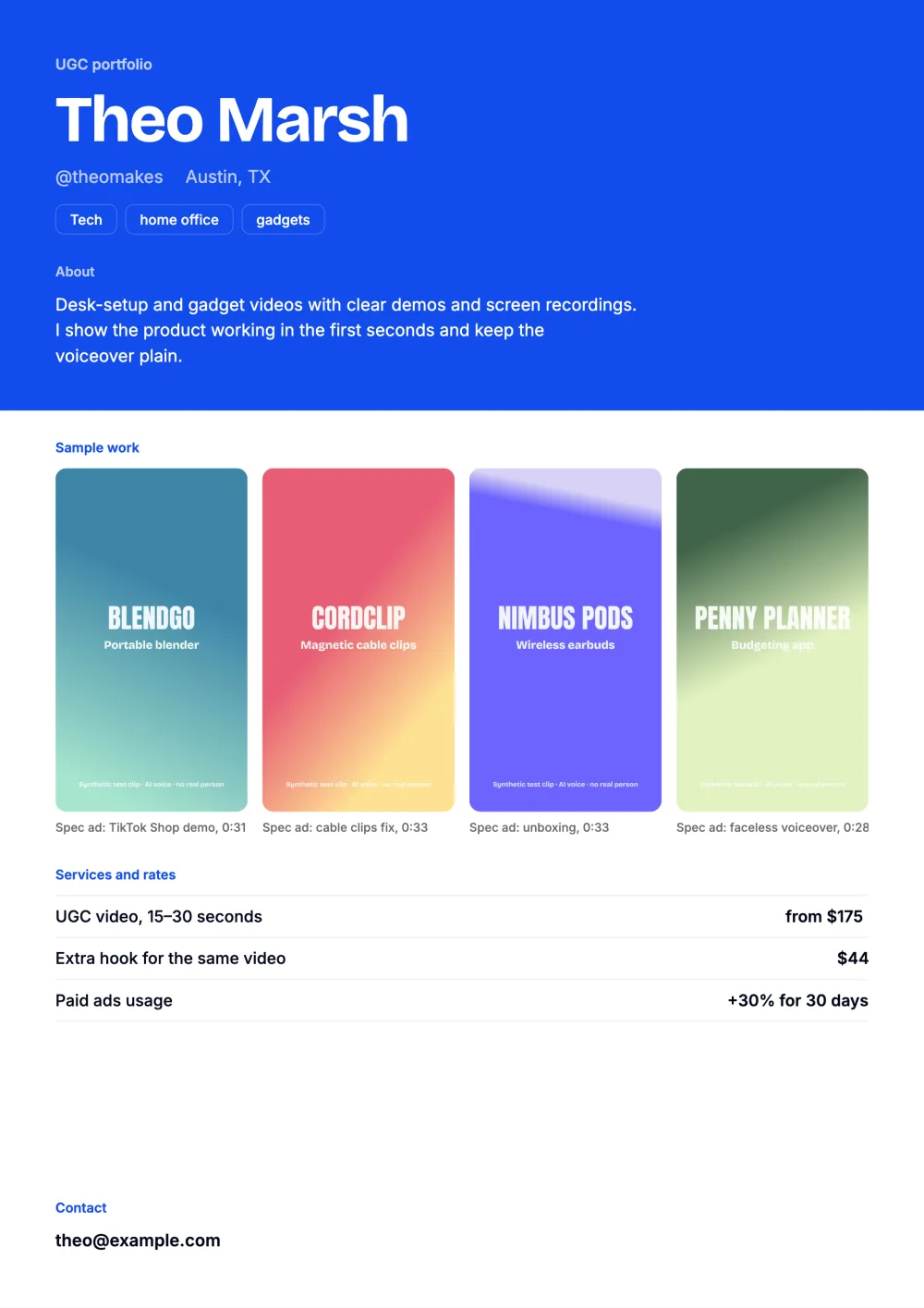
Here are three, one per layout, for creators we made up. Each was filled in with the builder above and saved with its Download PNG button. The sample tiles are frames from our own synthetic test clips (gradients with invented product names), standing in for your videos.

Sample UGC portfolio, Clean layout, for the fictional creator Juno Calder: a short bio, three spec ads (a serum testimonial, a 3 reasons video for a water bottle and an earbuds unboxing) and four services with rates.
Clean layout (tap to open full size)
Sample UGC portfolio, Bold layout with a blue band, for the fictional tech creator Theo Marsh: four spec ads in one row and three services with rates.
Bold layout (tap to open full size)
Sample UGC portfolio, Soft layout, for the fictional faceless creator Ines Varga: bio and services without rates on the left, four spec ads in a grid on the right.
Soft layout (tap to open full size)

Fictional creators, made with this builder on October 14, 2026, A4, one page. The rates on the first two are the rate calculator's beginner defaults; the third has rates switched off.

Which video formats should a UGC portfolio include?

Spread your three to six samples over at least three of these formats; each shows a brand something the others don't. The UGC examples guide breaks each of these down beat by beat.

UGC formats for a portfolio, and what each one shows a brand
FormatWhat's in itWhat it shows a brand
TestimonialYou on camera, saying what changed after using the product.That you sound natural and can carry a video with your face and voice.
Problem and solutionA problem the viewer has, then the product fixing it on screen.That you can structure an ad around a reason to buy.
Product demoYour hands using the product, close up, with a voiceover or captions.Clean framing, steady shots and a product that's easy to see.
Unboxing or first impressionOpening the package and your first reaction.Lighting, sound and a reaction that doesn't look staged.
Faceless (hands only)No face: hands, screen recordings and a voiceover.That you can make an ad for a brand that wants no faces on camera.

What order should the samples go in?

  1. Put the closest match first

    If you're pitching a skincare brand, the skincare sample goes first. The builder keeps your order, and the up arrow on each sample moves it earlier.

  2. Then change the format

    The second and third samples should be different formats from the first, so the brand sees range inside your niche instead of the same video three times.

  3. Cut the ones you'd reshoot differently

    The builder holds up to 6 samples, and three fill a row of the Clean layout on one page (the first sample portfolio above). A weak fourth sample sits next to your best ones.

  4. Move paid work up as it comes in

    When a brand lets you show a video you made for it, it replaces the spec ad in the same format.

What should each sample's caption say?

The format, what kind of product it was for, the length, and whether it was paid or spec. The builder gives each caption 40 characters, so leave out brand names and describe the product type. If you don't type a caption for a video, the builder prints its length.

Caption examples that fit the builder
CaptionWhy it works
Spec ad: testimonial, serum, 0:30A spec ad, its format, the product type and the length
Paid: unboxing for a snack brand, 0:24Paid work you can show, without naming a brand you aren't allowed to
Spec ad: faceless voiceover, app, 0:28Tells a brand it can run the video without a face

How to make a UGC portfolio with no followers

You don't need followers or past clients to start. Brands hire UGC creators for the videos, so a portfolio of spec work is enough to begin pitching:

  1. Pick one or two niches

    Choose products you use and can film well at home, so your samples look like ads in one category.

  2. Make spec ads

    Film short ads for products you already own, the way a brand would run them: a hook at the start, a demo and a reason to buy, with captions.

  3. Cover three formats

    A testimonial, a problem-and-solution demo and an unboxing show most of what brands ask for.

  4. Label spec work honestly

    Spec ads aren't brand work. Don't add those brands to your “worked with” list or suggest you were hired; call them spec or concept ads.

  5. Pitch, then replace

    Send the portfolio to smaller brands and agencies in your niche. As paid work comes in, swap the spec ads for real ones.

Where should the full videos live?

The PDF shows one frame per video, so put a link in the contact section to a place where the brand can press play. These are the usual options.

Places to host portfolio videos, with pros and cons
WhereGoodNot so good
CanvaFree plan, portfolio layouts, and a free Canva website where videos play.Laying it out by hand takes time, the free site lives on a Canva address, and a downloaded PDF can't play video.
A personal websiteYour own domain, playable videos, room for case studies, and a page brands can find by searching your name.A domain and site builder cost money every year, and it takes the most time to set up and keep current.
Google Drive folderFree, quick, and brands can watch or download the full-quality files.Looks plain, a folder left on restricted sharing shows brands a “Request access” screen, and big videos can take a while to preview.
Link-in-bio pageFree plans, quick to set up, and already linked from your profile.Limited layouts, free plans show the service's branding, and it's one more account to keep current.
A PDF or image (this page)Attaches to a pitch email or DM, works offline, and looks the same everywhere.Can't play video, so link to the full clips from the contact section.

How to use UGC portfolio template

  1. 1

    Fill in the basics

    Add your name, handle, niches and a two or three line bio. Platforms, audience numbers, rates and brands are optional; leave out anything you don't have yet.

  2. 2

    Add your sample videos

    Pick up to six photos or videos from your device. Each video shows a frame from near the start, and you can caption every sample with what it shows.

  3. 3

    Pick a template and download

    Choose Clean, Bold, Soft or Media kit, an accent colour and A4 or Letter, then download a PDF through the print window or a PNG image.

FAQ

UGC portfolio template FAQ

What is a UGC portfolio?

A UGC portfolio is a short collection of the videos and photos you've made for brands, or made to show what you can do, plus who you are, what you offer and how to reach you. Brands and agencies look at it to decide whether your style fits their product before they hire you.

What should a UGC portfolio include?

Your name and niches, a short bio, three to six of your best sample videos with a caption each, the services you offer (with rates if you're comfortable sharing them), brands you've worked with if you're allowed to name them, an email address and a link where the full videos play.

What do good UGC portfolio examples have in common?

The samples sit near the top: three to six short videos in different formats (a testimonial, a demo, an unboxing, a problem and solution), each captioned with the format, the product type, the length and whether it was paid or spec. They name one or two niches, list the services, and end with one way to get in touch. This page shows three sample portfolios made with the builder.

How do I make a UGC portfolio with no experience?

Make spec videos: short ads for products you already own, shot the way a brand would use them, such as a hook, a demo and a reason to buy. You don't need followers or past clients. Three to five well-made spec videos in your niche are enough to start pitching.

Is this UGC portfolio template free, and are my files uploaded?

It's free with no sign-up or watermark. Everything runs in your browser: your photos and videos are read on your device and never uploaded, and your text is saved only in this browser. Photos and videos aren't saved, so add them again after a reload.

Can I make a UGC portfolio in Canva instead?

Yes. Canva has portfolio and media kit templates and is good for custom designs, but you lay everything out by hand, and videos play on a Canva website but not in a downloaded PDF. This builder is quicker for a clean PDF or image, and you can add links to your full videos in the contact section.

Should my UGC portfolio be a PDF or a website?

Use both if you can: a one or two page PDF to attach to pitch emails, and a page with playable videos (a personal site, a Canva site, a Google Drive folder or a link-in-bio page) for brands who want to watch more. A PDF can't play video, so link to the full clips.


Still have questions?Email us

More free tools

From the UGCLive app

Make the sample videos your portfolio needs.
UGCLive's AI edit cuts the pauses and retakes from your takes, captions every word and writes hook options to test, all on your iPhone.
Join the waitlist
  • Starter will be free
  • No card to join the waitlist
  • Made for iPhone